
For realtors across Canada
e-Signatures made for Real Estate.
Get offers, counter-offers, amendments and disclosures signed from any phone, often before the showing ends. Every document ends with a Certificate of Completion that your brokerage, the other agent and the lender can rely on.
Built around your transactions
Everything a real estate deal needs, in one envelope.
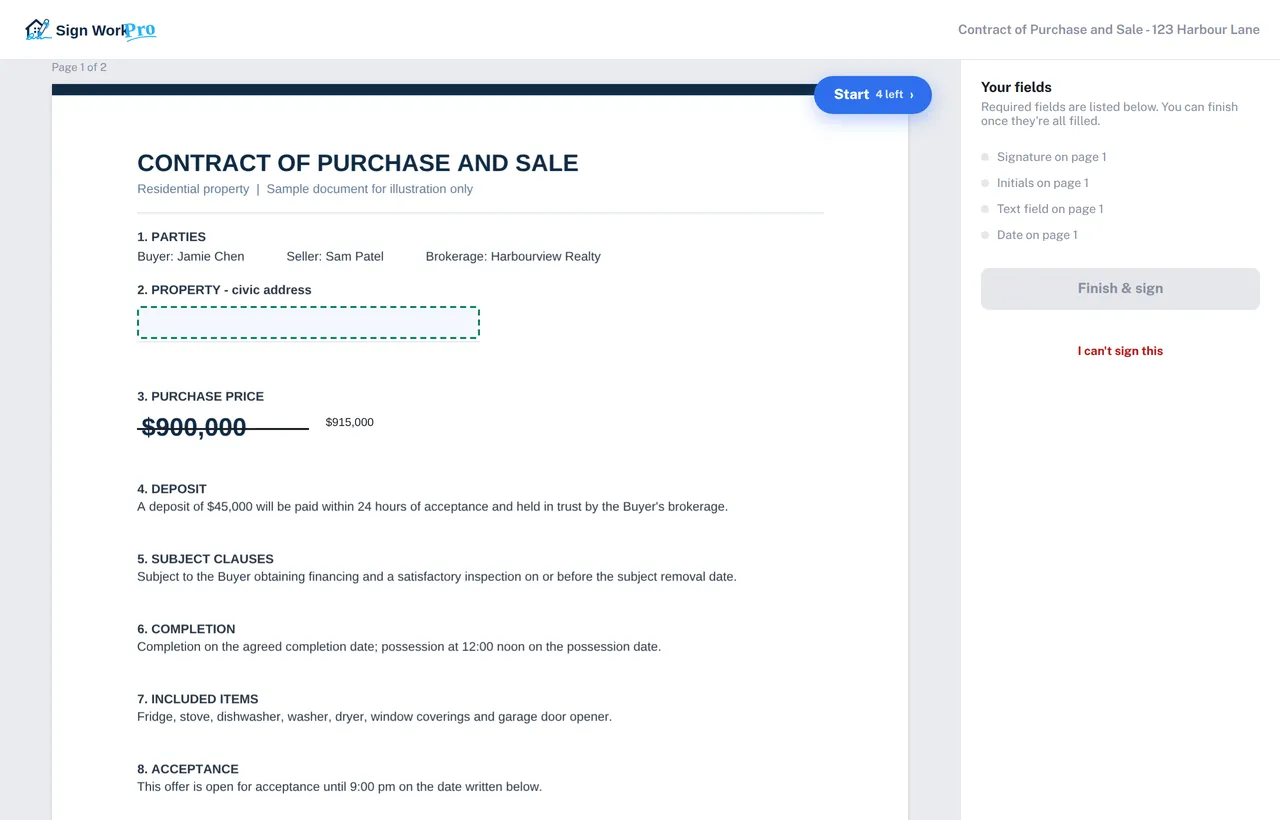
Offers in minutes
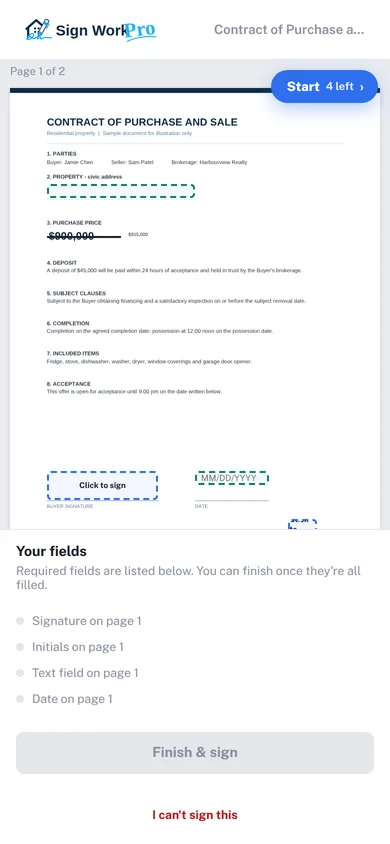
Send a Contract of Purchase and Sale by text or email and watch it come back signed. That matters in a multiple-offer situation.
Counter-offers and amendments
Strike out a price or date, write the new term beside it, and have every party initial the change, just like on paper.
Disclosures and addenda
Combine up to 20 PDFs and Word files in one envelope, such as the contract, addenda, disclosures and the property disclosure statement, so clients sign once.
Templates for your standard forms
Save the forms you use every week with fields already placed. “Detect fields” can place the buyer and seller initials for you.
Reminders that chase for you
Automatic reminders and deadlines keep subject-removal paperwork moving, and your reports show what is still waiting.
Straight into your transaction file
Set the copy email to the transaction’s address in Lone Wolf, zipForm, SkySlope or similar, and the signed contract is filed there automatically once everyone has signed. No uploading.
Compliance-ready records
A file your managing broker will be happy to review.
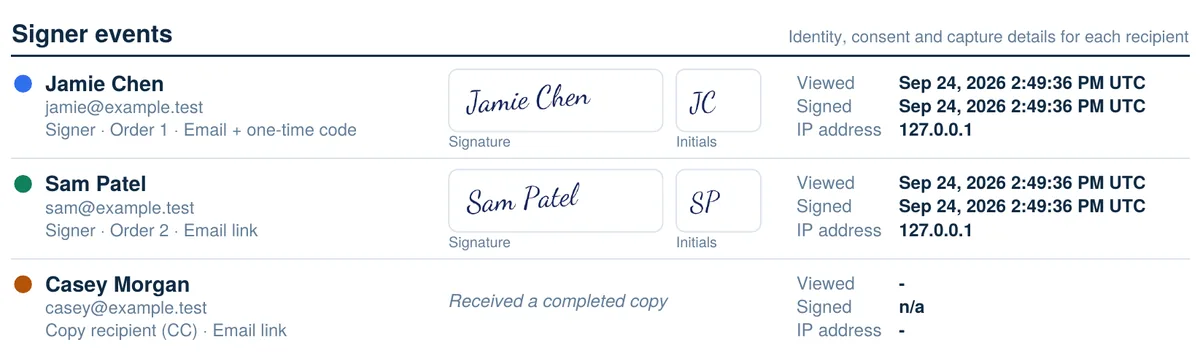
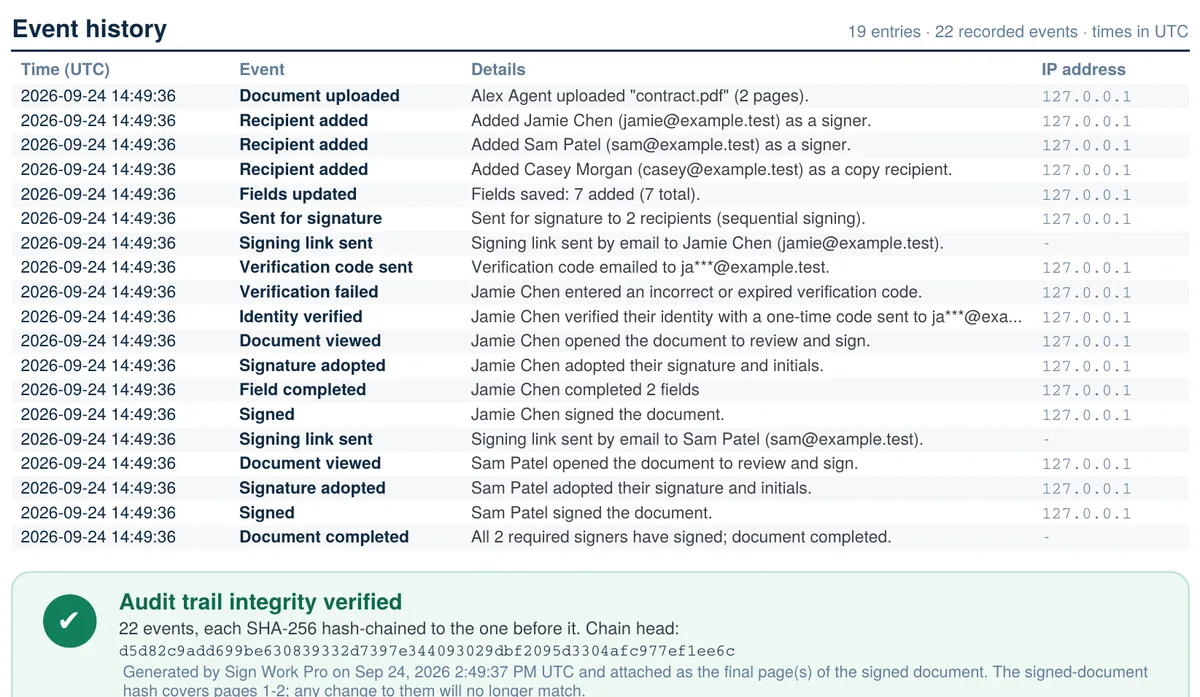
Every completed document carries its own Certificate of Completion with each signer’s verification, IP address, timestamps and the full event history. The audit trail can’t be edited, and every page is stamped with the document’s fingerprint.
- Recognized under PIPEDA and provincial electronic-transactions laws.
- Optional one-time code before a client can open the document.
- Your brokerage’s logo and name on every signing email.
- Clients keep a free portal with every document they have signed with you.

In my career as a REALTOR® I have seen huge changes in the way we manage the administration of a deal. Digital signing has revolutionized the way I manage client offers and the formal paperwork that goes with every real estate deal. But it wasn’t enough. I’ve used several digital signing apps over the years, trying to find one that made my job easier, amending contract terms, presenting counter offers and managing files for clients.
Using over 30 years of software development, I decided that it was time for a new way to digitally sign real estate documentation and Sign Work Pro was born. Built by realtors for realtors. My only regret – I should have done this a long time ago!
Questions from agents
E-signing real estate documents: FAQ
Can a Contract of Purchase and Sale be signed electronically?
Yes, in general. Electronic signatures are recognized across Canada under PIPEDA and each province’s electronic-transactions law, such as British Columbia’s Electronic Transactions Act and Ontario’s Electronic Commerce Act, and in the US under ESIGN and UETA. That covers most agreements, including offers, counter-offers, amendments and subject removals, as long as the parties agree to sign electronically. Check your brokerage’s policy and ask a lawyer about any document with special requirements.
Do my clients need an account or an app?
No. Each client gets a private link by email, text or WhatsApp and signs in their phone’s browser. After signing they can create a free portal login to see every document they have signed with you.
Can I use my brokerage’s standard forms?
Yes. Upload any PDF or Word form and save it as a template with its signature, initials and date fields already placed. Next time, pick the template, add the buyer and seller, and send.
Can signed contracts go straight into Lone Wolf, zipForm or SkySlope?
Yes. Transaction-management software such as Lone Wolf, zipForm and SkySlope lets you email documents straight into a transaction file. When you create the envelope, tick “Also email the completed document to another address” and paste in that transaction’s email address. As soon as the last person signs, the signed contract and its Certificate of Completion are delivered into the transaction automatically. No downloading, and no uploading documents yourself.
What does it cost?
Plans start at US$4.99 a month for one agent, with Professional and Team plans for growing teams of up to 8 people. Brokerages with more realtors get a per-realtor brokerage license with volume pricing. Annual plans save up to 15%, and you can cancel at any time.
General information, not legal advice. Follow your brokerage’s policies and your provincial regulator’s guidance for your practice. Lone Wolf, zipForm and SkySlope are trademarks of their respective owners; Sign Work Pro is not affiliated with them.
Send your next offer with Sign Work Pro.
Plans from $4.99 a month. No long-term contract: cancel any time.