
How it works
Every signature, provable.
Sign Work Pro records each step of a signing, from upload to the final signature, in a tamper-evident audit trail. Every completed document ends with a Certificate of Completion that shows exactly who signed, when and how.
Editing tools
All the tools you need
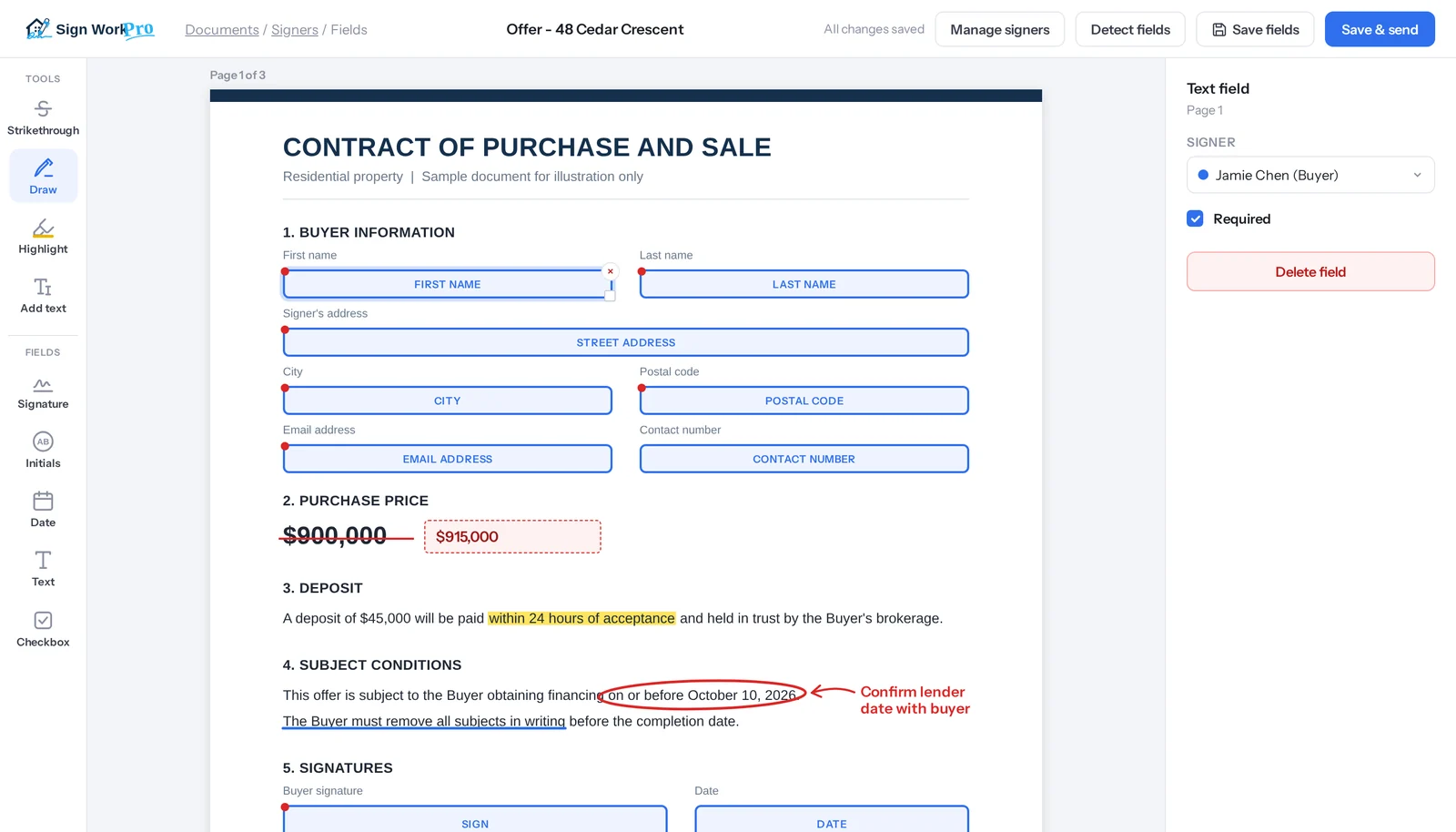
Mark up a contract and prepare it for signing in one place. Circle, underline, strike through, highlight and add notes right on the page, then place fields for each signer’s name, address, email and phone number so the details come back complete.
- Circle
- Underline
- Strikethrough
- Annotate
- Highlight
- First and last name
- Signer’s address
- City
- Postal code
- Email address
- Contact number
From upload to signed
Five steps, all recorded.
Each step below adds entries to the document’s audit trail automatically. There is nothing extra for you or your clients to do.
Upload
Add up to 20 PDF or Word files to one envelope. Every file is virus-scanned and fingerprinted before it is stored.
Prepare
Add signers and place signature, initials, date, text and checkbox fields, or strike through a term and write the change.
Send
Each signer gets a private link by email, text, WhatsApp, Messenger or Instagram, in the order you choose.
Sign
Signers can confirm a one-time code, then review and sign on any phone or computer. No app or account is needed.
Complete
Everyone gets the signed PDF with its Certificate of Completion, and it is saved to your client’s document portal.
Tamper-evident audit trail
A permanent record of who did what, and when.
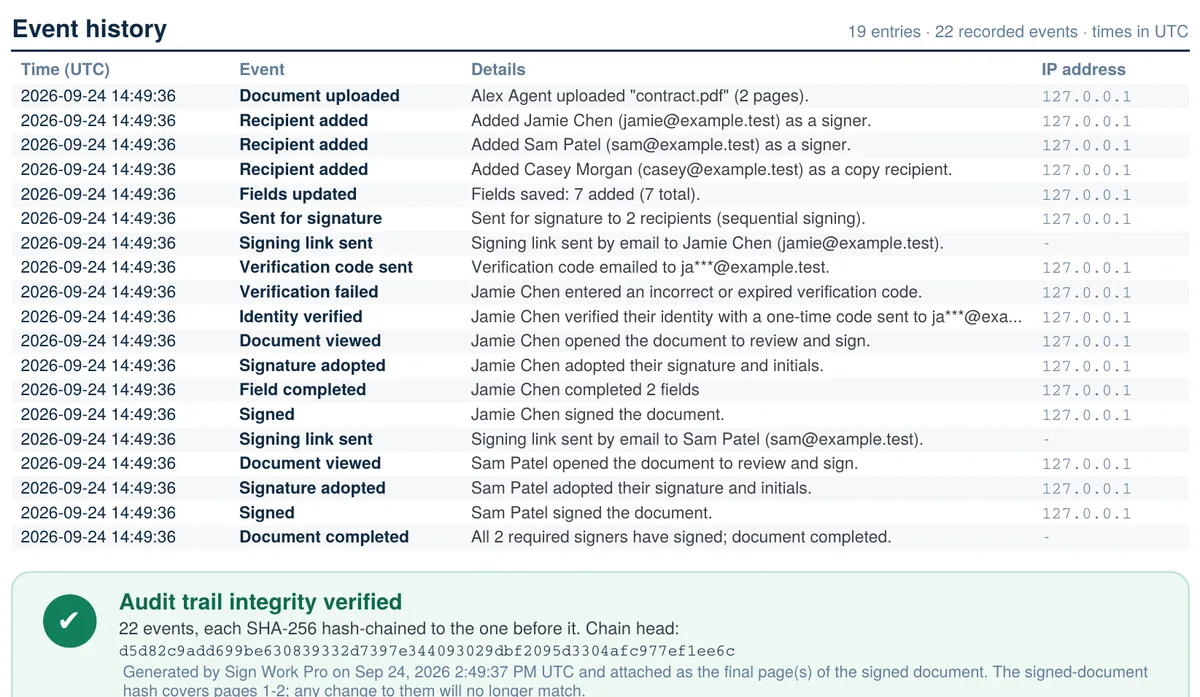
Every action on a document is written to its audit trail as it happens: uploads, recipients, fields, links sent, codes checked, views, signatures and completion. Each entry records the person, the time, and the IP address and browser used.
- Entries can only be added, never edited or deleted.
- Each entry is linked to the one before it with a SHA-256 hash, so any change breaks the chain and is detected.
- Sign-ins, lockouts, blocked uploads and billing events are recorded on your account’s own trail too.
- Export the full trail as a CSV file whenever a file review or dispute needs it.
Certificate of Completion
Proof that travels with the document.
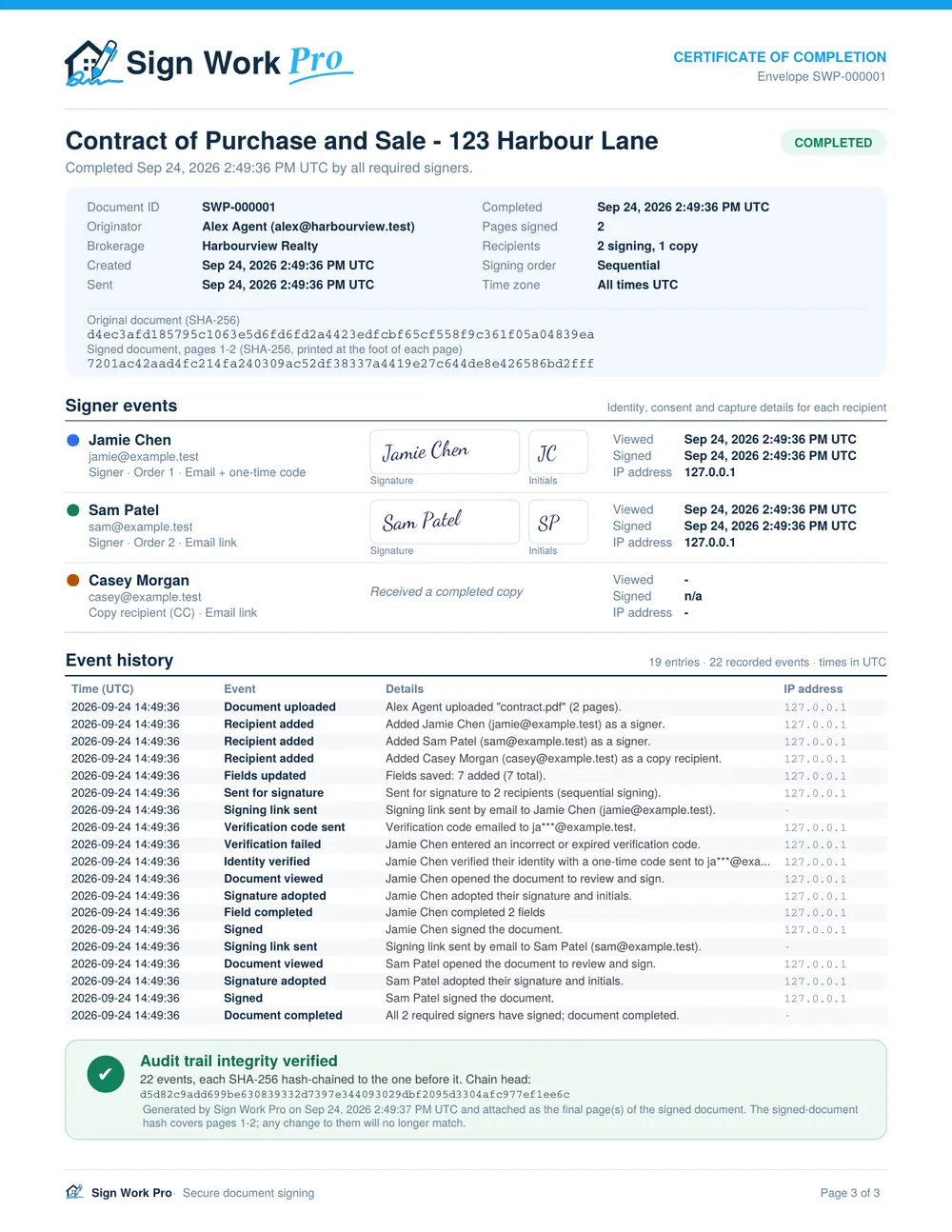
When the last person signs, Sign Work Pro adds a Certificate of Completion as the final page of the signed PDF. Anyone who receives the file, whether a brokerage, a lender or a lawyer, can see how it was signed without logging in anywhere.
- Envelope ID, originator, brokerage and every date: created, sent and completed.
- Each signer’s name, email, signing order, delivery method and verification.
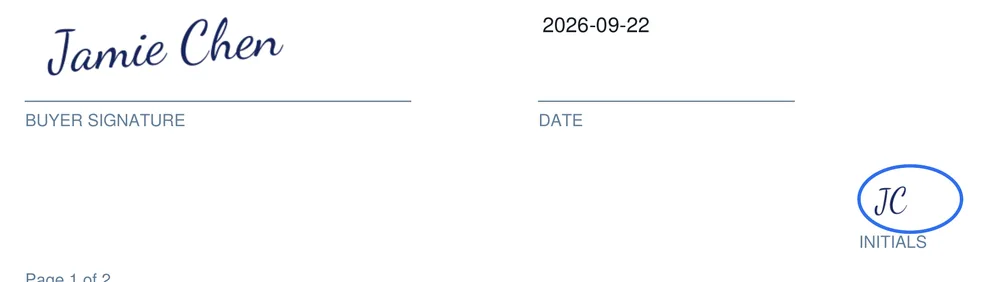
- Their adopted signature and initials, when they viewed and signed, and their IP address.
- SHA-256 fingerprints of the original upload and of the signed pages.
- The complete event history and an integrity check of the audit chain.
Document fingerprint
Every page says which envelope it belongs to.
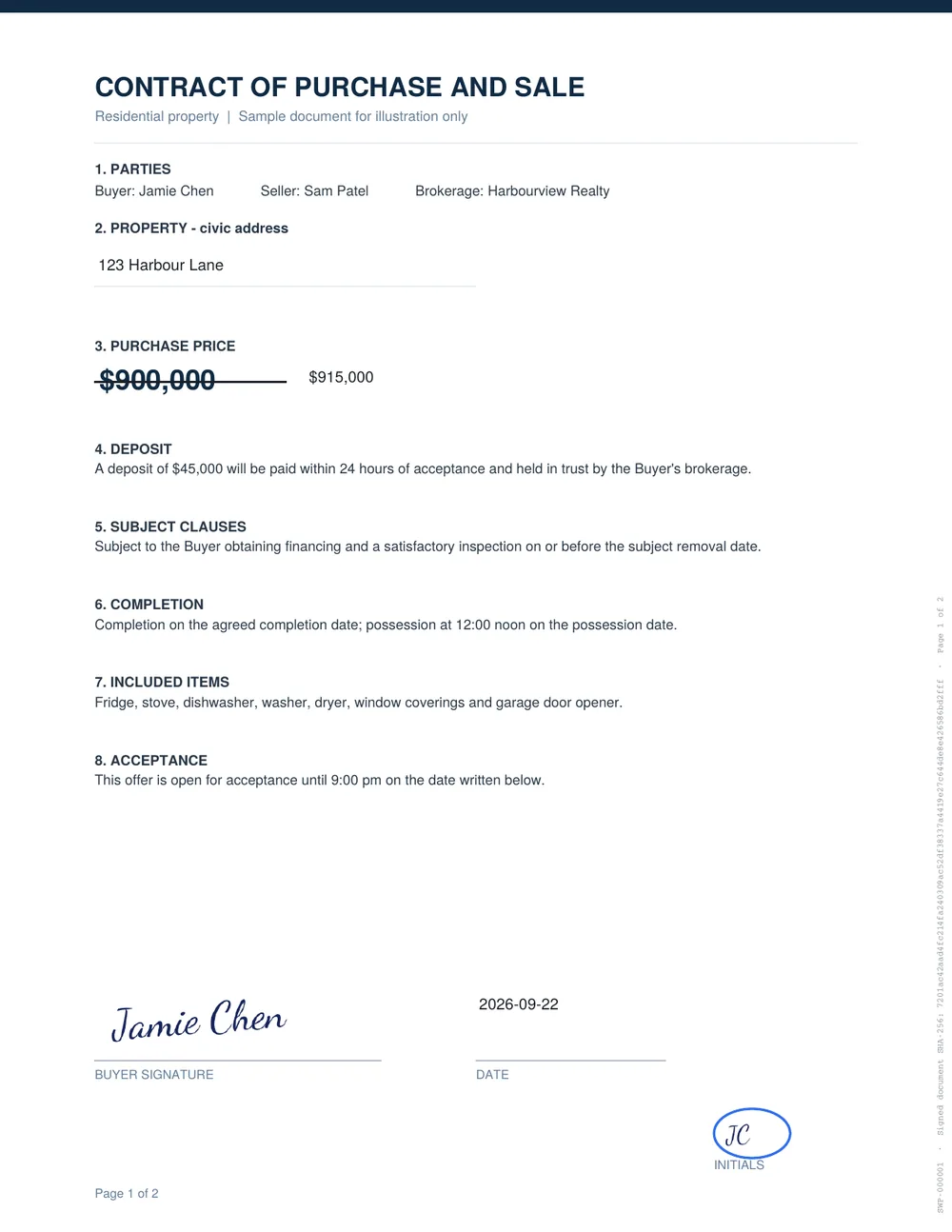
The margin of every signed page carries the envelope ID and the signed document’s SHA-256 fingerprint. A page can’t be quietly swapped between contracts, and any edit to the file after signing no longer matches the fingerprint on the certificate.

Trusted by design
Security built into every step.
Private signing links
Every signer gets their own long, random link that works only for them, only while the document is open, and can require a one-time code.
Two-step sign-in
Your team signs in with a password plus a code by text or email. Brokerages can require it for every user.
Virus-scanned uploads
Every uploaded file is scanned before it is stored. Anything suspicious is rejected, and nothing unscanned is ever kept.
Encrypted connections
Every page and file is served over HTTPS only, with strict browser security headers on every page.
Your data stays yours
Each brokerage’s documents, contacts and templates are kept separate from every other account. Automated tests check this on every release. See how customer data is protected under Canadian, US and EU/UK rules.
Lockouts and backups
Repeated failed sign-ins or code guesses are blocked and logged. Your documents are backed up every night.
Legally recognized
Built on the laws that make e-signatures binding.
Electronic signatures are recognized for most business and real estate documents across Canada and the United States. Sign Work Pro captures the evidence those laws look for: each person’s intent to sign, their consent to sign electronically, a link between the signature and the document, and a reliable record of it.
This is general information, not legal advice. A few document types have special requirements, such as wills, some powers of attorney and certain land-title filings. Check with your brokerage or lawyer if you are unsure about a specific form.
| Where | Law |
|---|---|
| Canada (federal) | Personal Information Protection and Electronic Documents Act (PIPEDA), Part 2 |
| British Columbia | Electronic Transactions Act |
| Other provinces | Each province’s electronic commerce or transactions act |
| United States | ESIGN Act (federal) and the Uniform Electronic Transactions Act (UETA) |
Questions
Audit trail and certificate FAQ
Are electronic signatures legally binding in Canada and the US?
Yes, in general. In Canada, electronic signatures are recognized under the federal PIPEDA and provincial electronic-transactions laws such as British Columbia’s Electronic Transactions Act. In the US, the federal ESIGN Act and state UETA laws apply. A small number of document types have special rules, so check with your brokerage or lawyer if you are unsure about a specific form.
What is a Certificate of Completion?
It is a page added to the end of every completed document. It lists who signed, when, how they received the link, how their identity was checked, the IP address they signed from, the full event history and the SHA-256 fingerprints of the original and the signed document.
How can I tell if a signed document was changed?
Every page of the signed PDF carries the envelope ID and the document’s SHA-256 fingerprint in its margin. If anyone edits the file afterwards, its fingerprint no longer matches the one on the pages and in the certificate, and the audit record shows the original.
Can the audit trail be edited?
No. Audit entries can only be added, never changed or deleted, and each entry is chained to the one before it with a SHA-256 hash. Changing or removing any entry breaks the chain, which Sign Work Pro detects and reports.
How do signers prove who they are?
Each signer gets their own private link. You can also require a one-time verification code before they can open the document. Every view, code, field and signature is recorded against that signer.
Start signing in minutes.
Plans from $4.99 a month. No long-term contract: cancel any time.